Pop, sports and anime · Pro template
Stadium Star sports trading card template
In short
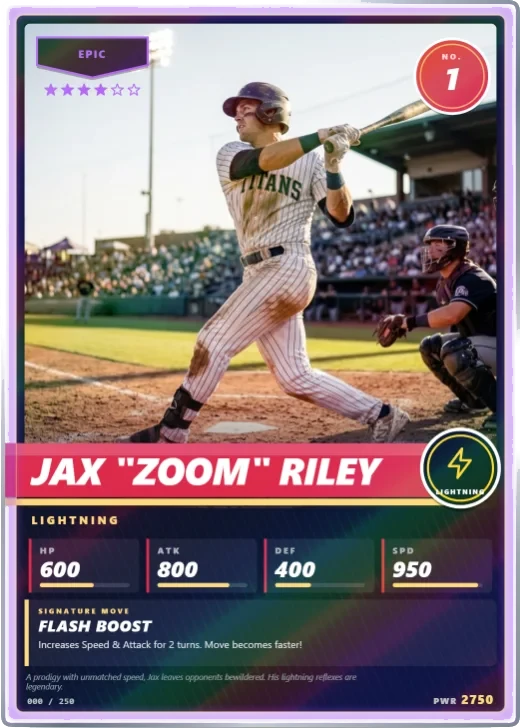
Stadium Star is a Pro pop, sports and anime trading card template in Wallzy: a white-bordered sports card with a full-width photo, slanted name band, jersey number and stat line. It prints at the standard 63 × 88 mm, comes with 5 colour palettes and a matching Team crest back, and every part is a layer you can edit in your browser.
Stadium Star is a classic sports card. White card stock frames a full-width photo, a slanted name band breaks out over the left border, the level becomes a jersey number, and the element becomes the team emblem on the end of the band. The position sits in an accent colour and the stats line up in four columns along the foot.
Its default holo is a rainbow refractor sheet, the shiny finish collectors look for.
Included in the Pro and Studio plans. On the Free plan the editor shows it, and picking it offers the upgrade.

Stadium Star at a glance
| Style | Pop, sports and anime: Sports card: white border, name band, jersey number |
|---|---|
| Plan | Pro template |
| Card size | 63 × 88 mm (2.5 × 3.5 in), the standard trading card size |
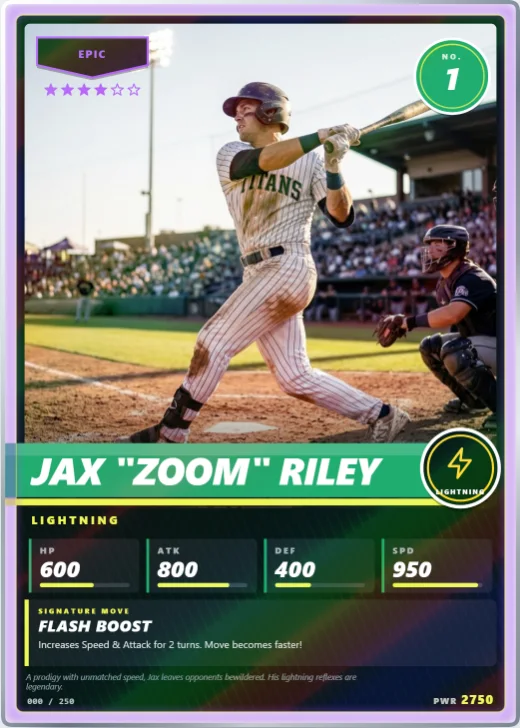
| Palettes | 5: Home Red, Royal Court, Green Pitch, Chrome Night, Sunset Wave |
| Matching back | Team crest |
| Best for | Custom cards of your team or club; Player gifts and end-of-season keepsakes; Fantasy league cards |
What is on the card
- Full-width player photo
- Slanted name band
- Jersey number and team emblem
- Position line
- Four-column stat line
- Rarity pennant with stars
Good for
- Custom cards of your team or club
- Player gifts and end-of-season keepsakes
- Fantasy league cards
- Sports-themed card games
Colours and the back
Stadium Star comes with 5 palettes: Home Red, Royal Court, Green Pitch, Chrome Night, Sunset Wave. Pick one in one click, or set the seven colours yourself. A Look changes the palette, frame and lettering together.
Its matching back is Team crest, which follows the front's colours and shape. You can choose any other back, and add your set name, a tagline and a logo.
How to use it
- Open it in the editor. The button above starts the editor on Stadium Star, with a sample card already filled in.
- Make it yours. Change the name, stats and words in the Text panel, add your picture in the Picture panel and pick a palette in Style.
- Download or print it. Make a free account to download a PNG, or with Pro a print PDF with bleed. See printing at home.
Every part of the template is a layer you can move, restyle or hide, so it is a starting point, not a form.